Why we repainted the whole shop
WhichDrawer exists because of a particular place: my father's basement workshop, and the 8 × 8 metal cabinet of little drawers whose peeling labels were more rumor than record. But the app we launched looked nothing like that place. It looked like software — white, gray, tidy, anonymous.
So we redesigned it, top to bottom. We call the new look the Heirloom Workshop: warm paper surfaces, one brass accent, sage for good news and oxide red for warnings, typewriter type for every number and label, and little stamped badges where software would normally put a colored dot. Quantities read like stencils. Recent changes get an EDITED stamp like a job ticket. Even the app icon got the same hand-stamped treatment.
None of this changes what the app does. It changes how it feels to stand in it — less like filling in a database, more like keeping a good logbook.
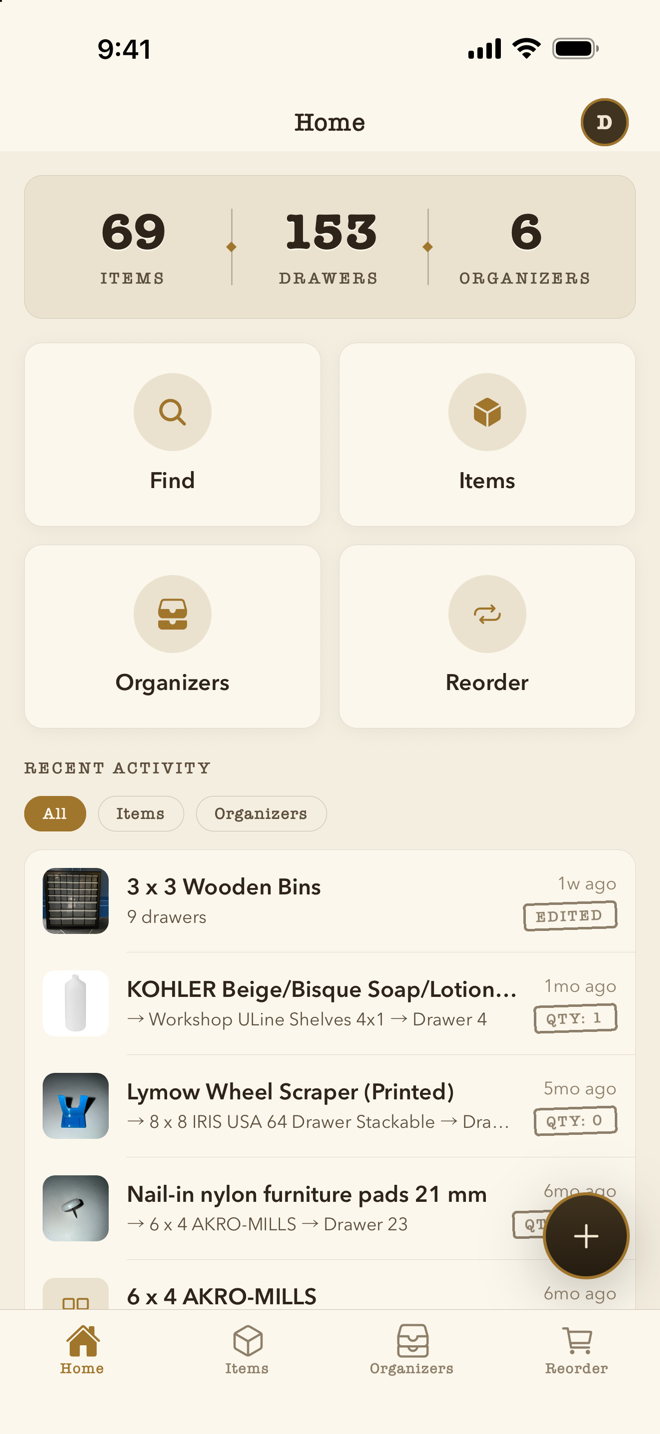
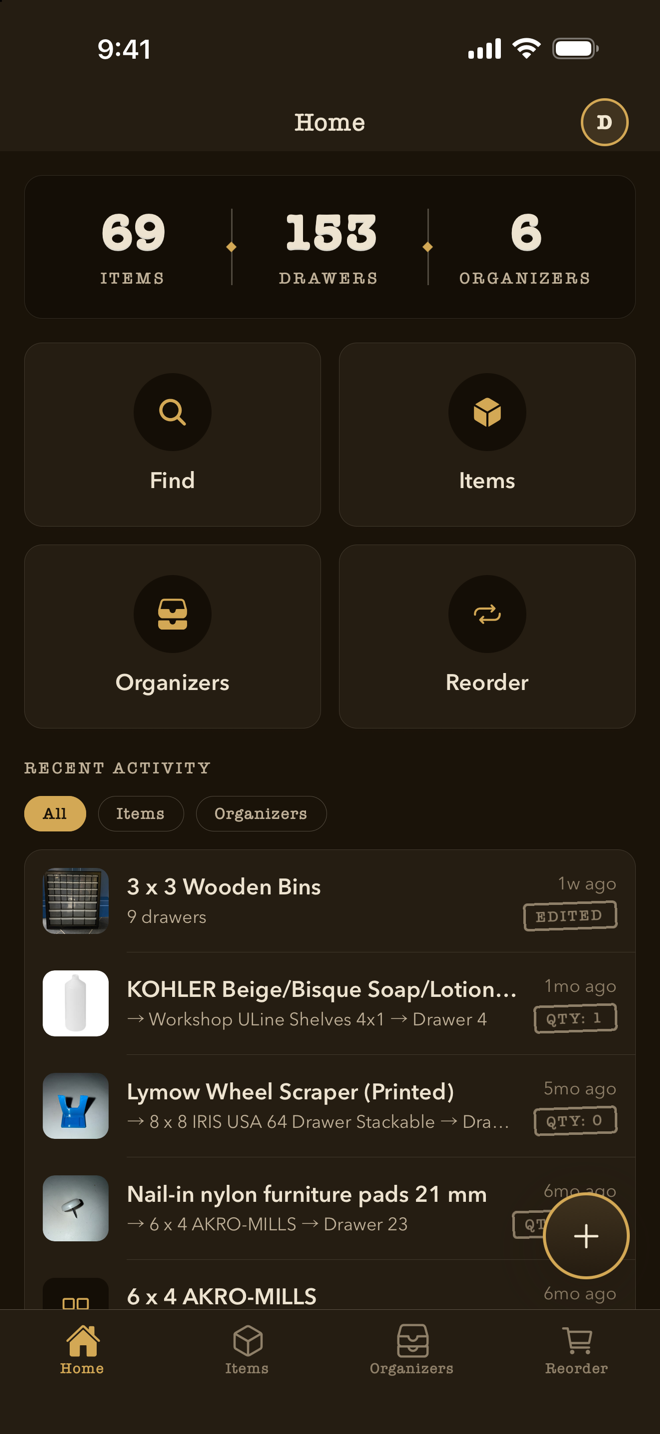
Lamplit, not gray
Dark mode was the most requested part of the refresh, and we refused to do the usual thing where the interface turns charcoal and all the warmth drains out. WhichDrawer's dark mode is lamplit: deep warm browns, cream ink, brass that still glows. It's the workshop after dinner, for the midnight where-are-the-spare-fuses run. It follows your system setting automatically.
AI search you can trust with every photo
WhichDrawer's party trick has always been photo search: snap a picture of a mystery part — or pick one from your library — and the app answers with a drawer. That only works if every photo you add actually makes it into the search index, and in earlier versions some didn't: add five photos to an item, and a closed app or a dead spot in the garage could quietly leave a few of them unsearchable.
1.1 fixes this properly. Photo indexing now picks itself back up — after you close the app, after you're back in coverage, after anything — and keeps at it until the job is done. We also went back and indexed the photos that older versions had missed, so your existing library is covered without you lifting a finger. If you can find an image of it, and you have it, we'll tell you where it is — and that promise now holds for photo number five as well as photo number one.
Share an organizer with anyone
You can now share a single organizer by email — the camera-gear bin with a friend, the medicine drawer with the babysitter — and the invitation works even if the other person hasn't signed up yet. It simply waits: when they create an account with that email, the organizer is there. They get a read-only view of what's stored where; your inventory stays yours to edit. (Households — full sharing for the people you live with, with pooled subscription limits — are unchanged and still the right tool for family.)
Catalog faster
- Scan barcodes from photos. The live camera scanner now has a sibling: pick any photo from your library and WhichDrawer reads the barcode straight off it. Catalog from the couch using the photos you took in the garage.
- Import from CSV. Already keeping an inventory in a spreadsheet? Bring it in whole.
- Export to CSV or JSON. It's your data; take it wherever you like.
A proper Security screen
Everything protective now lives in one place: turn on two-factor authentication with your authenticator app, lock the app behind Face ID or Touch ID, and review your account's recent activity. Sign-in also supports iOS Password AutoFill, so your password manager can do the typing.
Tell us what to build next
There's a feedback board in the app now — post ideas, report bugs, and vote on what other people have suggested. It's the same board we plan from, not a suggestion box that empties into the void. Go tell us what's missing.
And the polish
1.1 is tuned for iOS 26, and it carries dozens of small fixes across the layout editor, sharing, and sync — the kind you stop noticing because things simply work.
Get WhichDrawer 1.1
If you already have WhichDrawer, 1.1 is a free update — the same app, wearing the clothes it should have been born in. If you don't: your first organizer is free with no time limit. Download WhichDrawer on the App Store.